
A350 - Troubleshooting-Guide

40
|
Hardware
5. Turn off the machine and plug in another toolhead cable to repeat step 3 and 4 until you have tested all the
toolheads.
- If the problem persists, please contact us with the results and a recorded video via email.
- If the toolheads can be detected, then the problem is with the Linear Modules or the port on the Controller.
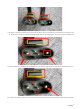
6. Turn off the machine, andplug in the cable of each Linear Modules into the axes ports on the Controller, one
at a time. See if they can be detected.
The picture below provides an example. In this picture, X1, Y1&Y2, andZ1&Z2 represent the X axis, Y axis,
and Z axis respectively.Write down the result (detectable/not detectable) of each test.
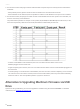
- If all the Linear Modules can be detected, thenruncross tests with the cables of two Linear
Modulesplugged in at the same time.
- If again everything turns out fine, thenrun cross tests withthe cables of three Linear Modulesplugged in at
the same time.
- If still everything is normal with the Linear Modules, thentheconverter is broken.Replacing a new converter
can solve the issue.Turn off the machine, and reconnect all the cables (select any of the three toolheads),
and turn it back on. See if the problem persists. If yes, then contact us.
Alternative toUpgrading Machine's Firmware via USB
Drive
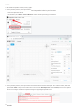
Apart from using aUSB drive, you can also upgrade the firmware using the software Postman. For detailed
instructions, see:Upgrade via Postman.pdf.