
A350 - Troubleshooting-Guide

42
|
Software
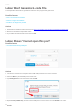
Luban Won'tGenerate G-code File
The Snapmaker Luban fails togenerate G-code files. The progress bar gets stuck.
Possible Causes
• This is an old version of Luban.
• There is a bug in the software.
• The file is too large to be parsed.
Actions
1. Download and install the latest version from
https://snapmaker.com/product/snapmaker-2/downloads.
2. Restartor reinstall the Snapmaker Luban.
3. Try a smaller G-code file that is less than 100 MB.
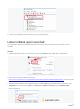
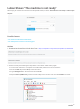
Luban Shows "Cannot open this port"
Possible Cause
• You selected the wrong COM port.
Actions
1. Connect the machine to a computer with a USB cable, and then turn onthe machine.
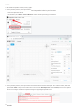
2.Press theWinkey and theRkey at the same time.
3. Typedevmgmt.mscin the search box and clickOK.
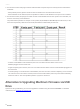
4. ExpandPorts (COM & LPT), and the correct COM port to connect is the one with CH340 in its name.