
A350 - Troubleshooting-Guide

|
43
5. LaunchtheSnapmaker Luban, select the correct port and try again.
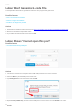
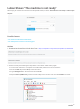
Luban Is BlankuponLaunched
The Snapmaker Luban goes blank rightafter you launchit, and only the menu bar on the top-left corneris
available.
Actions
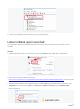
1. Reload Snapmaker Luban.On the menu bar, clickView > Reload (or press Ctrl + R)to reload Luban.
2. Download and install the latest versionfrom
https://forum.snapmaker.com/t/snapmaker-2-0-firmware-updates-and-downloads/5443/12. See if this solves
the problem. If not, go to step 3.
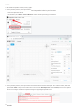
3. Uninstall Luban and delete the configuration files.Press theWinkey and theRkey at the same time.Type
%appdata% in the blank, and clickOK.From Username > AppData > Roaming, selectsnapmaker-luban
folderanddeleteit.