
User's Manual




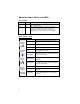


Table Of Contents
- Copyright Notice
- Table of Contents
- 1 | Introduction
- 2 | Setup for Windows Mobile
- 3 | Setup for Palm OS
- 4 | Setup for Windows 98SE/Me/2000/XP
- 5 | Setup for Windows XP Tablet Edition
- 6 | Setup for Mac OS X
- Appendix A Specifications
- Appendix B Network Information
- Appendix C Manual Dial-up Connection Setup
- Appendix D Advanced Software Installation
- Appendix E Faxing
- Appendix F Technical Support
- Limited Warranty
- Regulatory Compliance

About the Power Switch and LEDs
Power Switch
Position Status Meaning
Down Off The battery-powered version will recharge if plugged
into a power suppy.
Up On The battery-powered version will run on battery
power if not plugged into a power supply. The
battery-powered version will run on AC power if
plugged into a power supply, and also recharge.
Status Indicator LEDs
LED LED Activity Meaning
Off
No data is being transferred to the phone
line.
Blinking Green Data is being transferred to the phone line.
Modem
Status
Solid Green Connected with no data transmission.
Off No Bluetooth connection.
Bluetooth
Status
Blinking Blue
Bluetooth connection established. Modem
ready to transmit data.
Blinking Green
Adequate battery level (more than 10%
charged).
Battery
Level
Blinking Red
Low battery level (less than 10% charged).
Recharge immediately.
Off Power supply not plugged in.
Solid Green
Power supply plugged in, more than 90%
charged.
Battery
Charging
Status
Solid Amber
Power supply plugged in, less than 90%
charged.
8