
Battery Communications Integration Guide

01 JUNE 2022 V 2.6 10
Blue Ion/Namaka
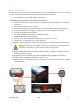
The Sol-Ark will need a Namaka monitoring device and a wired internet connection to establish
communications with the Blue Ion battery.
• You will not need to make a custom cable for this setup.
Communications Installation and Setup Instructions
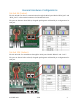
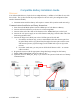
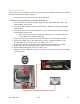
1. Connect all Blue Ion cabinets together using their “RS-485 Modbus RTU” ports and
standard RJ45 ethernet cable.
2. Connect the daisy-chained cabinets to the Namaka’s “BMU” port using standard RJ45
ethernet cable.
3. Connect the ethernet port on the Namaka to an active, wired internet connection using
standard RJ45 ethernet cable.
a. Some Namaka units may be configured for Wireless or no internet connection.
Contact Blue Ion for further information.
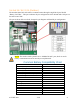
4. Connect the 12V power connection from the Namaka to the nearest Blue Ion BMU.
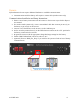
5. Connect the “BMS” port on the Namaka to the inverter’s “Battery CAN Bus” port
(outdoor units only) or to the “CAN” port (indoor units only).
6. Program the inverter with the appropriate charge/discharge settings for this battery.
7. Power on the Namaka by flipping the DC breaker in the unit’s enclosure.
8. Enable “BMS Lithium Batt” and set its value to “00”.
9. (Optional) Turn on “BMS_Err_Stop” if you wish for the system to fault on loss of battery
communications.
Local Network