
Battery Communications Integration Guide


01 JUNE 2022 V 2.6 11
Fortress eFlex 5.4
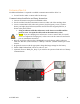
No additional hardware is required to establish communication with the eFlex 5.4.
• You will need to make a custom cable for this setup.
Communications Installation and Setup Instructions
1. Connect all batteries using the included RJ45 cables.
2. Use the included 120 Ohm termination resistor on either end of the resulting chain.
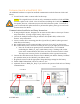
3. Create a custom RJ45 cable where only pins six (6) (solid green), seven (7) (white-
brown), and eight (8) (solid brown) remain connected in their original positions, as
shown in the picture below.
a. Using an ethernet cable that is known to work is more accessible and less
prone to error. Cut open the cable, and cut the unnecessary wires.
b. NOTE: If you are crimping new connectors to create a custom cable, be careful
not to over-tighten the crimping tool, as this can recess the connectors and lead to
poor or intermittent connection.
4. Plug one end of the cable into the CAN/RS485 port on the battery and the other into
either the “RS-485” (indoor models) or “Battery CAN Bus” (outdoor models) port on the
inverter.
5. Program the inverter with the appropriate charge/discharge settings for this battery.
6. Enable “BMS Lithium Batt” and set its value to “04.”
7. (Optional) Turn on “BMS_Err_Stop” if you wish for the system to fault on loss of battery
communications
Inverter Port