
Battery Communications Integration Guide


01 JUNE 2022 V 2.6 14
SimpliPhi AmpliPhi
No additional hardware is required to establish communication with SimpliPhi AmpliPhi units.
• You will not need to make a custom cable for this setup.
Communications Installation and Setup Instructions
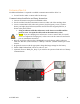
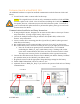
1. Connect all batteries using the included RJ45 cables, using the two ports nearest each
other to bridge the batteries together (GREEN in the picture below).
2. Use the included 120 Ohm terminators on both ends of the resulting chain.
3. Use either the battery from the beginning or the end of the chain. Connect an RJ45 cable
from the separate RJ45 port (RED in the picture below) to the “CAN” or “Battery CAN
Bus” port on the inverter.
4. Program the inverter with the appropriate charge/discharge settings for this battery.
5. Enable “BMS Lithium Batt” and set its value to “00.”
6. (Optional) Turn on “BMS_Err_Stop” if you wish for the system to fault on loss of battery
communications.