
Battery Communications Integration Guide

01 JUNE 2022 V 2.6 8
Dyness
Dyness Batteries do not require additional hardware to establish communications.
• Communications with this battery will require a custom cable (Outdoor units only)
Communications Installation and Setup Instructions
1. Ensure correct battery interconnection and connect to the inverter as specified in Dyness’
user manual.
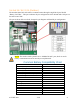
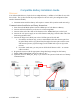
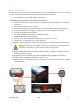
2. For outdoor-rated systems only, create a custom RJ45 cable that connects pin two (2) on
the battery to pin six (6) on the inverter.
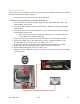
3. Connect one of the batteries to the inverter via the CAN Bus port.
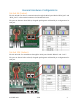
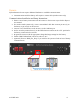
4. Set the switch in position three (3) on the DIP selection switches to the “ON” position for
the battery connected to the inverter.
5. Program the inverter with the appropriate charge/discharge settings for this battery.
6. Enable “BMS Lithium Batt” and set its value to “00.”
7. (Optional) Turn on “BMS_Err_Stop” if you wish for the system to fault on loss of battery
communications.
Inverter Port