
SolisCloud Quick Start User Guide



w: solisinverters.come: ussales
@
solisinverters.com
Select
Finding alarm
information
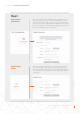
Select - Alarm Information
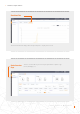
Click on the icon called “O&M” on the left side of the screen to view Alarm information. The
alarms are broken down into three categories: Pending, Processed, and Restored. Pending
alarms are current alarms that have not cleared. Restored alarms have been resolved by the
system and are no longer showing up as a fault.
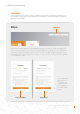
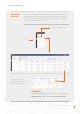
Pending alarms can be either
ignored or deleted by mousing over
“Operation” on the right side
PLEASE NOTE:
If pending alarm is not going away, please contact the service team by calling
(866)438-8408 or by sending an email to: usservice@solisinverters.com
10 - SolisCloud / Using the Platform