
SolisCloud Quick Start User Guide


w: solisinverters.come: ussales
@
solisinverters.com
Part 3:
Commissioning Systems
(Creating Plants and Adding Dataloggers)
11 - SolisCloud / Commissioning Systems
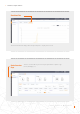
• Start out on the Plant Overview page.
• Click on “Add Plant” in the top right corner of the browser page.
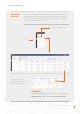
Enter in all of the plant
information and add
the datalogger serial
number. The Installed
Capacity is the size of the
system, not the inverter.
Earnings per kWH
should be the rate at
which the utility charges
for power. Finally, click
“Create Plant” to finish.
The plant will now show
up under the plant list
but please allow the
system half an hour to
display data. Guests may
be added here as well.
Add a
new plant
Adding a new plant (Desktop)