
SolisCloud Quick Start User Guide


w: solisinverters.come: ussales
@
solisinverters.com
Part 4:
Organization & Management
(Adding new users and guests)
13 - SolisCloud / Organization & Management
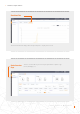
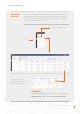
• To add additional members to your organization, click the icon called “Service” on the left side of the page
The new user will receive an email with a link to SolisCloud where they can then log in and add plants of their own.
Click “Add member” and
then enter in the information
of the user that you wish to
add. This feature is designed
for individual installers and
technicians to be added to an
installation/O&M organization.
Adding Additional Members
Add member
Continue on the next page .
(Select)
(Select )
Step 3.
Step 1.
Step 2.