
SolisCloud Quick Start User Guide


w: solisinverters.come: ussales
@
solisinverters.com
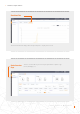
When the guest logs in to the new platform, they will need to click “Advanced Search”, then click “All” under “Plant Display”,
and then click the orange “OK” in order to view the systems to which they have been added as a guest.
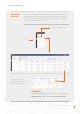
To enable or disable Alarm Notification emails and push messages, click on the “O&M” icon and then click “Alarm
Notification” in the top right corner of the page.
Continue on page over...
New Guest Login (Setup)
New Guest Login (Enable or Disable Alarm Notification )
(Select)
(Select)
(Select )
(Select )
(Select )
(Select )
(Select )
Step 3.
Step 1.
Step 4.
Step 5.
Step 1.
Step 2.
Step 2.
15 - SolisCloud / Organization & Management