
SolisCloud Quick Start User Guide


w: solisinverters.come: ussales
@
solisinverters.com
16 - SolisCloud / Organization & Management
New Guest Login (Enable or Disable Alarm Notification ) continued.
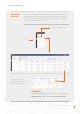
• Push notifications will be displayed
by your mobile phone.
• If you wish to receive push
notifications then make sure the
“Push Notification” slider is set
to “Opened” with “Emergency
Alarm” all three alarm types
turned on.
• Email notifications will be sent to
the email address of the registered
user.
• The address of who will receive
the email notifications can be
manually changed here, be sure
that the “Email Message” slider is
set to “Opened”.
(Select)
(Select)
(Select )
(Select )
(Select )
(Select )
(Select )