
SolisCloud Quick Start User Guide


w: solisinverters.come: ussales
@
solisinverters.com
17 - SolisCloud / Organization & Management
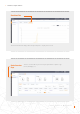
If an inverter needs to be removed from a plant, select the plant and then click “Device” on the left side of the page. Mouse
over “Operation” on the right side of the page and then click “Delete” to remove the inverter from this site.
• Now a new inverter can be added to this site.
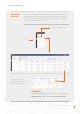
Dataloggers can also be replaced this way. Select “Datalogger” and then delete the logger in order to add a new one.
This process unbinds the datalogger from the system allowing the logger to be installed on a different system and for the
original system to have a new datalogger added.
Removal of Inverter from Plant
Removal of Dataloggers
(Select)
(Select )
(Select )
(Select )
Step 3.
Step 4.
Step 1.
Step 2.