
SolisCloud Quick Start User Guide

w: solisinverters.come: ussales
@
solisinverters.com
Part 2:
Using the Platform
(Monitoring & Alarms)
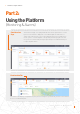
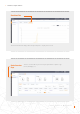
The Plant Overview page comes up by default and shows all of the plants that were created
by the user. The Plant State is displayed as a colored dot alongside the word “Online” or
“Offline”. A green dot means the system is generating without any issues. A red dot means
that the system is communicating but is currently having an alarm. A grey dot means that
the system is not communicating. Clicking on a plant will open a new tab that will allow you
to explore that plant’s details.
Plant Overview
Page
8 - SolisCloud / Using the Platform
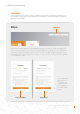
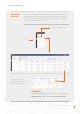
The Plant Location displays a map and a list of your systems. Clicking on a system will take you to the location that has
been associated with that plant.
Plant Location Tab