
User's Manual
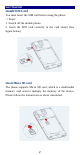

Table Of Contents
- Get Started
- Keys and Parts
- Lock and Unlock the Screen
- Notification Panel
- Arranging and Rearranging Widgets and Icons
- Adding Folders on your Screen
- Adjusting Brightness
- Changing your Wallpaper
- Make a Call
- Call Log
- Reject a Call by Sending a Busy Message
- Add a Contact
- Messaging
- Browse the Web
- Enjoy Music
- Download Applications From Android Market
- Manage Applications
- Maintenance & Safety

2
Get Started
Install SIM Card
You must insert the SIM card before using the phone.
-> Steps:
1. Switch off the mobile phone.
2. Insert the SIM card correctly in the card slot(s) (See
figure below)
Insert Micro SD card
The phone supports Micro SD card, which is a multimedia
memory card used to multiply the memory of the device.
Please follow the instructions as above mentioned.