
Troubleshooting Q&A


33
Troubleshooting
. . . . . . . . . . . . . . . . . . . . . . . . . . . . . . . . . . . . . . . . . . . . . .
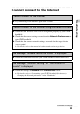
I cannot connect to the Internet
I cannot connect to the Internet
B Try connecting to the Internet again after a while.
I cannot connect to the Internet using a Wireless LAN card
B Check that the Wireless LAN card is recognized properly by your CLIÉ
handheld.
B Check that the correct settings are made under Network Preferences on
your CLIÉ handheld.
B Check that the correct network settings are made for the target device
(access point).
b
For details, refer to the manual of each network card or target device.
The message “Modem cannot be found” is displayed
B Check the connection between your CLIÉ handheld and network card.
The message “Incorrect setting” or “Certification is
invalid” is displayed
B Check the settings of Network in the Preferences screen.
b
For details, refer to “Customizing your CLIÉ™ handheld (Preferences):
Changing the Network preferences” in the “Handbook.”
Continued on next page
• • • • • • • • • • • • • • • • • • • •