
Use and Care Manual

5
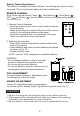
Fig. 9
Safety Touch Stop Sensor
This feature is designed to protect children. Fan will stop with a touch on the
fan guard. This is a protection feature and not a malfunction.
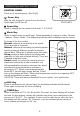
REMOTE CONTROL
Keys on the remote control: Power ( ), Wind Speed ( ), Wind Mode ( ),
OSC ( ) and Timer ( ) have the same functions as corresponding keys on
the unit. (Fig. 9)
1. Remote Control Operation
• Point the remote control at the control panel and press
the desired key.
• Make sure to align the emitter at the front of the remote
control to the receiving window on the panel.
• Avoid direct sunlight onto the control panel, this may
affect how well the remote control works.
2. Batteries (not included)
• Slide off the battery compartment cover located at the
back of the remote.
• Insert batteries and make sure the batteries are placed
as shown in Fig. 10.
• Replace battery cover.
NOTE: use size “AAA” manganese or alkaline batteries.
WARNING:
• Do not dispose batteries in re or high heat
locations, batteries may explode or leak.
• Do not mix old and new batteries.
• Do not mix alkaline, standard (carbon-zinc) or
rechargeable (nickel-cardmium) batteries.
TILT ADJUSTMENT
To adjust airow upwards or downwards, push
the head gently to desired angle.
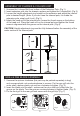
HEIGHT ADJUSTMENT
Loosen the height adjustment ring and adjust
the internal pole to desired height. Tighten the ring when done (Fig. 3)
Fig.10
CLEANING
1. Be sure to unplug from the electrical supply source before cleaning.
2. Plastic parts can be cleaned with mild soap and a damp cloth or sponge.
Follow with clean damp towel to remove soap lm.
3. Be sure water or other liquid does not come in contact with the motor.