
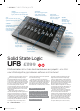
Solid State Logic

tucked away for neatness, and protects them
from being knocked accidentally. Notable by its
absence, though, is any form of power switch –
there is a tradition that older SSL consoles are
never switched of, but we don’t think such an
approach is the best for a DAW controller!
Push the button
UF8 arranges the setup and functionality of all
of its faders, knobs and buttons into “Layers”,
with three layers available. The idea is that you
conigure each layer to work with a particular
DAW – or indeed to work with the same DAW in
three diferent ways – and you can then instantly
switch between layers using the dedicated
buttons on the UF8.
Layers are conigured using the SSL 360°
software, which acts as the main hub for UF8,
and deals with converting the hardware’s
control signals into protocol- and DAW-speciic
messages. SSL 360° contains layer presets for all
major DAWs, but these are highly customisable,
especially with regards to the functionality of
the Soft Keys (see boxout).
Not all of UF8’s button functions are
modiiable, of course – there’s plenty of standard
fare that’s common across all controllers, such
as zooming and navigating, selecting subpages
of efect or synth settings, and of course
controlling which DAW channels are being
controlled by the UF8. This you can switch in
banks of eight tracks or, by twirling the unit’s
data entry dial, you can step forward and back
by one track at a time. The names of the
currently active tracks are shown in the LCD
panels, and often that name will be truncated to
it the available space, which can get a bit tricky
if you haven’t allowed for this in your track
naming. Nonetheless, the label is large, clear and
easy to read.
The displays show other useful info too, such
as the names and values of the parameters that
are under the control of the rotary encoders at
any time, the channel signal level, and the
channel’s record enabled state. However, when
focussing in on just one channel to edit EQ,
plugin or instrument settings, for example, the
full track name is displayed across as many of
the displays as it needs. This of course means
that the names of the other tracks are hidden,
but their level meters and record enabled
markers remain on display. This combination of
single-channel focus and multi-channel readout,
all within one screen, is a bit confusing until you
become accustomed to it.
At heart, UF8 works like any other DAW
controller, allowing you to navigate your
session, perform basic editing operations within
your DAW, and of course modifying mix, plugin
and instrument parameters – it’s a fairly
standard recipe these days. UF8 does, however,
stand apart from much of the competition: it is
more compact than most, yet manages to have
a less cluttered control surface, all without
sacriicing any functionality. The 100mm
motorised faders are delectably smooth, with
not a jot of resistance or “trembling” from the
motors, and the displays are bright, clear and
detailed. It’s positioned at the upper end of the
DAW controller market so won’t suit all pockets,
but UF8’s design and build quality render the
circa £1k price tag very reasonable. And, let’s
face it, it always feels a bit special to approach a
bank of faders that carry the Solid State Logic
badge.
Web solidstatelogic.com
Verdict
For Super-smooth 100mm
motorised faders
High deinition displays on each channel
Flexible and adaptable Soft Keys system
Extends the standard HUI protocol
Against No power switch?
Mixed info on displays – confusing
UF8 is a slick, attractive and highly useable
DAW controller that exudes SSL’s
legendary quality and attention to detail
9 / 1 0
Alternatively
Icon Qcon Pro G2
Around £460
Functional and afordable, and can
be expanded up to 32 channels
with Qcon Ex expansion modules
Mackie Control Universal Pro
Around £1020
The brand who laid down the
communication protocols used by
most DAWs and DAW controllers
UF8 can communicate via both HUI
(Human User Interface) and MCP
(Mackie Control Protocol, aka MCU),
and so can work with all major DAWs.
On the HUI front, SSL has additional
features that enhance the core abilities
of the protocol, giving Pro Tools users a
greater degree of control over channel
sends and pans, and plugin parameters,
than is available with a standard HUI
controller. UF8 communicates with all
other DAWs via MCP, but diferent
DAWs implement the protocol in
diferent ways. Typically, DAW
controllers deal with this through the
use of printed overlays that you place
over the controller’s buttons, thereby
giving the buttons accurate labels for
the DAW you’re using. SSL have
sidestepped this issue entirely, though,
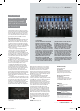
thanks largely to the UF8’s “Soft Keys”
feature: running along the top of the
unit is a set of eight of these so-called
Soft Keys, one above each channel.
Each key’s function is displayed at the
top of the channel’s LCD screen, which
is located just below the Soft Key, and
you can quickly switch between six
diferent Soft Key mappings using the
bank of buttons at the top-left of the
controller. This allows UF8 to be much
less cluttered with buttons, and for it to
adapt efortlessly to whatever DAW
you’re using.
Soft Keys
360° app is described as the “brain and command
centre” of UF8
The Soft Keys function is a smart way of showing button mappings between DAWs
“The 100mm
motorised faders are
delectably smooth,
not a jot of resistance
or ‘trembling’”
July 2021 / COMPUTER MUSIC / 73
solid state logic uf8 / reviews <
CMU296.rev_SSL_UF8.indd 73CMU296.rev_SSL_UF8.indd 73 29/04/2021 11:1229/04/2021 11:12