
User Manual

Page 53GX1600
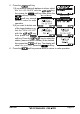
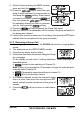
5. Press the soft key.
6. Press the / key to scroll through the first
letter of the name of the group you want to refer-
ence in the directory.
7. Press the soft key to store the first letter in
the name and step to the next letter to the right.
8. Repeat step 6 and 7 until the name is complete.
The name can consist of up to eleven characters, if
you do not use all eleven characters press the
soft key to move to the next space. This
method can also be used to enter a blank space in
the name. If a mistake was made entering in the
name repeat pressing the soft key until the
wrong character is selected, then press the /
key to correct the entry.
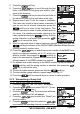
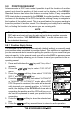
9. After the eleventh letter or space has been entered, press and hold the
soft key to advance to the GROUP MMSI (Maritime Mobile Service
Identity Number) number entry.
10. Press the / key to select the second number of the MMSI (nine
digits: first digit permanently set to “0”) which you
want to contact, then press the soft key to
step to the next number. Repeat this procedure until
all eight space of the MMSI number are entered.
11. If a mistake was made entering in the MMSI number repeat pressing the
soft key until the wrong number is selected, then press the /
key to correct the entry.
12. To store the data entered, press and hold the soft key.
13. To enter another group address, repeat steps 5 through 12.
14. Press the soft key several times to return to radio operation.
9.7.2 Transmitting a Group Call
9.7.2.1 Group Call using the Individual Directory
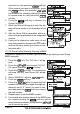
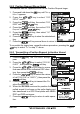
1. Press the key. The “DSC Menu” will appear.
2. Press the / key to select “GROUP”. (To can-
cel, press the key.)
3. Press the soft key. The transceiver will beep,
and the “Last Group Call” will appear.
4. Press the / key to select the “Group” you
want to contact.
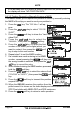
5. Press the soft key, then press the /
key to select the operating channel you want to com-