
User Manual

GX1600Page 56
9.8 POSITION REQUEST
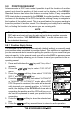
Advancements in DSC have made it possible to poll the location of another
vessel and show the position of that vessel on the display of the GX1600.
Standard Horizon has taken this feature one step further, if any compatible
GPS chart plotter is connected to the GX1600, the polled position of the vessel
is shown on the display of the GPS chart plotter making it easy to navigate to
the location of the polled vessel. This is a great feature for anyone wanting to
know the position of another vessel. For example your buddy that is catching
fish, or finding the location of a person you are cruising with.
NOTE
The other vessel must have an operating GPS receiver connected to its
DSC radio and must not have its radio set not to deny position requests.
(Refer the section “10.5 INDIVIDUAL CALL” to enter information into
the individual directory).
9.8.1 Position Reply Setup
The GX1600 can be set up to automatically (default setting) or manually send
your position when requested by another vessel. This selection is important if
you are concerned about someone polling the position of your vessel that you
may not want to. In the manual mode you will see the MMSI or persons name
shown on the display allowing you to choose to send your position to the re-
questing vessel.
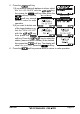
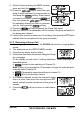
1. Press and hold down the key until “Setup Menu”
appears.
2. Press the / key to select “DSC SETUP”
menu.
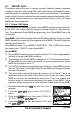
3. Press the soft key, then select “POSITION
REPLY” with the / key.
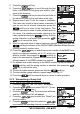
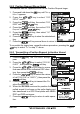
4. Press the soft key, then select “AUTOMATIC”
or “MANUAL”. In “AUTOMATIC” mode, after a DSC
POS Request is received, the radio will automati-
cally transmit your vessels position. In “MANUAL”
mode, the display of the GX1600 will show who is
requesting the position and the YES soft key on ra-
dio has to be pressed to send your position to the
requesting.
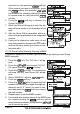
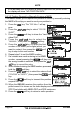
5. Press the soft key to store the selected set-
ting.
6. Press the soft key several times to return to radio operation.