
User Manual



Page 79GX1600
11.3 SCAN TYPE
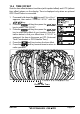
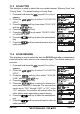
This selection is used to select the scan mode between “Memory Scan” and
“Priority Scan”. The default setting is Priority Scan.
1. Press and hold down the key until “Setup Menu”
appears.
2. Press the / key to select “CH FUNCTION
SETUP”.
3. Press the soft key, then select “SCAN TYPE”
with the / key.
4. Press the soft key.
5. Press the / key to select “PRIORITY SCAN”
or “MEMORY SCAN”.
6. Press the soft key to store the selected set-
ting.
7. Press the soft key several times to return to
radio operation.
11.4 SCAN RESUME
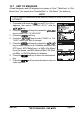
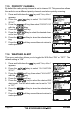
This selection is used to select the time the GX1600 waits after a transmission
ends before the radio start to scan channels again. The default setting is 2
seconds.
1. Press and hold down the key until “Setup Menu”
appears.
2. Press the / key to select “CH FUNCTION
SETUP”.
3. Press the soft key, then select “SCAN RE-
SUME” with the / key.
4. Press the soft key.
5. Press the / key to select the desired re-
sume time, default is 2 seconds. The resume time
can be set to “1SEC” through “5SEC”, or “OFF”. In the
“OFF” selection, the scanner will resume after the
other station stops transmitting (carrier drops).
6. Press the soft key to store the selected set-
ting.
7. Press the soft key several times to return to
radio operation.