
User Manual




Page 111GX2000/GX2150
gram the other soft keys.
7. Press the soft key, then press the
or key to select “KEY TIMER” (selects how
long the soft key icon will be shown on the
display after a soft key is pressed, default is 5
seconds). Then, press the soft key.
8. Press the or key to select the time.
9. Press the soft key to store the selected setting.
10. Press the soft key several times to return to radio operation.
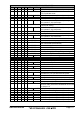
DISPLAY
DIMMER
SCAN
DW
IC
PA/FOG
CPS: COMPASS
WPT
AIS
AIS AL
PRESET
MARK
PSET 0 - PSET 9
FUNCTION
Select the menu for the display and key back light intensity
Starts and stops Scanning.
Starts and stops Dual Watch Scan.
Activates Intercom between radio and RAM3 mic.
Activates the PA / Fog Horn function.
Shows to the “Compass” display.
Shows to the “Waypoint” Navigation display.
Shows to the “AIS” display.
Toggles the AIS alarm “on” and “off”.
Porgrams or deletes the preset memory channel.
Refer to section 8.9 for operation
Mark the current position for a “Waypoint”.
Immediately recalls the preset memory channel.
Refer to section 8.9 for operation