
User Manual





GX2000/GX2150Page 38
NOTE
When in the PA HAIL mode it is possible to simultaneously use the AIS
page by press the key.
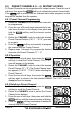
8.11.2 FOG HORN Operation
The user can select from “Underway”, “Stop”, “Sail”, “Tow”, “Aground”, “An-
chor”, “Horn”, and “Siren”.
1. Press the one of the soft keys momentarily, then
press the soft key.
Note: The soft key may have to be pressed
to see the soft key if the soft keys have not
be customized.
2. Rotate the CHANNEL knob to select “FOG”, then
press the soft key.
3. Rotate the CHANNEL knob to select one of the eight
functions described above.
4. Press the soft key.
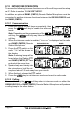
5. On the “Horn” and “Siren” modes, press the PTT
switch to activate the tone through the HAIL/PA
speaker.
Rotate the CHANNEL knob to control the AF output level. The AF output
level can be set from 0 to 30 watts.
6. To listen back (GX2150 only), rotate the PWR/VOL knob.
7. To exit the FOG HORN mode, press the key.
NOTE
When in the FOG HORN mode it is possible to simultaneously use the
AIS page by press the key.