
User Manual



GX2000/GX2150Page 54
9.5.5 Transmitting an Individual Call
This feature allows the user to contact another vessel with a DSC radio. This
feature is similar to calling a vessel on CH16 and requesting to go to another
channel.
9.5.5.1 Individual Call using the Individual Directory
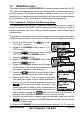
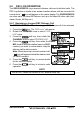
1. Press the key. The “DSC Menu” will appear.
2. Rotate the CHANNEL knob to select “INDIVIDUAL”.
(To cancel, press the soft key.)
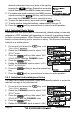
3. Press the soft key. The transceiver will beep,
and the “Last Individual Call” will appear.
NOTE
To ease making Individual calls, the GX2000/
GX2150 will show the NAME of last Individual
call transmitted.
4. Rotate the CHANNEL knob to select the “Individual”
you want to contact.
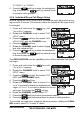
5. Press the soft key, then rotate the CH knob
to select the operating channel you want to com-
municate on, then press the soft key. If the
channel is not shown in the list, press the
soft key, then rotate the CHANNEL knob to select
the operating channel you want to communicate on,
then press the soft key.
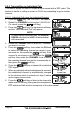
6. Press the soft key to transmit the individual
DSC signal.
7. When an individual call acknowledgment is received,
the established channel is automatically changed
to the channel which is selected on step 5 above
and a ringing tone sounds.
8. Press the soft key to listen to the channel to
make sure it is not busy, then press the microphone’s
PTT switch and talk into the microphone to the other vessel.