
User Manual



GX2000/GX2150Page 56
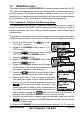
and a ringing tone sounds.
12. Press the soft key to listen to the channel to make sure it is not
busy, then press the microphone’s PTT switch and talk into the micro-
phone to the other vessel.
9.5.6 Receiving an Individual Call
When a Individual DSC call is received, the radio will automatically respond
(Default setting) to the calling ship, and switch to the requested channel for
voice communications. Refer to section “9.5.2 Individual Reply Setup” to change
the reply to manual if you want to see who is calling before replying to the call.
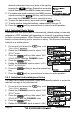
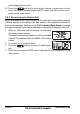
1. When an individual call is received, an individual
call ringing alarm sounds.
The radio automatically switches to the requested
channel. The display shows the MMSI of the vessel
calling.
2. Press any key to stop the alarm.
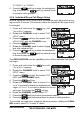
3. Press the soft key to return to radio opera-
tion
4. Press the microphone’s PTT switch and talk into the microphone to the
other vessel.