
User Manual




GX2000/GX2150Page 98
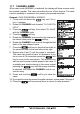
13.4 CPA ALARM
This function allows you to set the CPA (Closest Point of Approach)
alarm
distance.
: CPA means the positions at which two moving vessels reach their closest
possible distance.
1. Press and hold down the key until
“Setup Menu” appears.
2. Rotate the CHANNEL knob to select “AIS/
COMPASS SETUP”.
3. Press the soft key, then select “CPA
ALARM” with the CHANNEL knob.
4. Press the soft key.
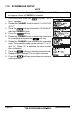
5. Rotate the CHANNEL knob to select the dis-
tance you want the radio to alert you of an
approaching AIS fitted vessel.
6. Press the soft key, then rotate the CHAN-
NEL knob to set the Alarm item to “On”.
7. Press the soft key to store the selected setting.
8. Press the soft key several times to return to radio operation.
NOTE
The alarm will sound until it is disabled (1) by pressing any key, (2)
following the steps above and in step 6 select “Off” or (3) when the ship
is out of the selected CPA alarm distance. The alarm is produced from
the front panel speaker, speaker in the mic, the optional external speaker
and optional RAM3 mic when connected.
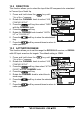
13.5 TCPA ALARM
This function allows you to set the TCPA (Time to Closest Point of Approach)
time alarm.
: Setting up a TCPA alarm sets a time point where the radio will alarm when
an AIS equipped vessel approaching within the time selected.
1. Press and hold down the key until
“Setup Menu” appears.
2. Rotate the CHANNEL knob to select “AIS/
COMPASS SETUP”.
3. Press the soft key, then select “TCPA ALARM”
with the CHANNEL knob.