
User Manual




Page 99GX2000/GX2150
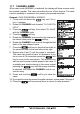
4. Press the soft key.
5. Rotate the CHANNEL knob to select the time
that the TCPA alarm will sound.
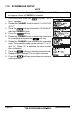
6. Press the soft key, then rotate the
CHANNEL knob to set the Alarm item to “On”.
7. Press the soft key to store the selected set-
ting.
8. Press the soft key several times to return to radio operation.
NOTE
The alarm will sound until it is disabled (1) by pressing any key, (2)
following the steps above and in step 6 select “Off” or (3) when the ship
is out of the selected TCPA alarm time. The alarm is produced from the
front panel speaker, speaker in the mic, the optional external speaker
and optional RAM3 mic when connected.
13.6 DISPLAY RANGE
The radio can show AIS targets on the display. This menu item allows setting
of the range rings on the display. The default setting is 15NM.
NOTE
A GPS must be connected to the radio to show AIS targets.
1. Press and hold down the key until
“Setup Menu” appears.
2. Rotate the CHANNEL knob to select “AIS/
COMPASS SETUP”.
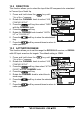
3. Press the soft key, then select “DIS-
PLAY RANGE” with the CHANNEL knob.
4. Press the soft key.
5. Rotate the CHANNEL knob to select the de-
sired range. Available range selections are
0.5, 1.0, 2, 5, 10 and 15NM.
6. Press the soft key to store the selected set-
ting.
7. Press the soft key several times to return to
radio operation.
NOTE
When the AIS page is shown, pressing one of the Soft keys will show a
soft key. Press this key and move the CHANNEL knob to change
the range.