
Manual


Instruction Manual
3
5. Click on the Next folder to begin installation.
6. When installation is complete, click Finish and restart your computer.
Windows NT 4.0
1. Open the WinNT folder on the driver disk and double-click on the Nt40.exe icon.
2. Click Continue.
3. Click Next to begin the installation process.
4. Select “Yes to restart” and click Finish to reboot your computer.
Specications
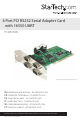
Host Interface 32-bit PCI (3.3V/ 5V)
Form Factor Full Prole
Chipset MosChip MCS9845
Connectors 4 x DB9 male
Supported Serial Protocol RS-232
Maximum Data Transfer Rate 115.2 Kbps
Compatible Operating Systems
DOS, Windows 95/ 98SE/ 2000/ XP(32/64-
bit)/ Server 2003(32/64-bit)/ Vista(32/64-
bit)/ 7(32/64-bit)/ Server 2008 R2, Linux,
Mac OS 10.4/ 10.5
Windows XP Embedded/ POS Ready 2009/
Embedded System 2009 OS/ CE 5.0/ 6.0