
Instruction manual

Instruction Manual
3
Software Installation
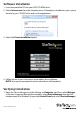
1. Insert the provided CD into your DVD/CD-ROM drive.
2. Select Autorun.exe from the Autoplay menu. If Autoplay is disabled on your system,
browse to your CD/DVD drive and run the application.
3. Select the Driver Installation option.
4. Follow the on-screen instructions to complete the installation.
NOTE: You may be prompted to restart once the install completes.
Verifying Installation
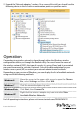
1. Open the Device Manager by right-clicking on Computer, and then select Manage.
In the new Computer Management window, select Device Manager from the
left
window panel (For Windows 8, open the Control Panel and select Device Manager).