
Instruction manual

Instruction Manual
4
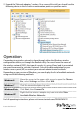
2. Expand the “Network adapters” section. On a successful install, you should see the
following device in the list with no exclamation points or question marks.
Operation
Connecting to a wireless network is done through either the Windows wireless
conguration utilities, or through the Realtek utility. You must know the name of
the wireless network (SSID), the type of security it is using (if any) and its associated
password to connect to a wireless network. Consult the documentation for your
wireless access point (AP) or contact your network administrator for details.
Depending on your version of Windows, you can display the list of available networks
using one of the following methods:
Windows 8
Move the cursor to the upper right corner to open the Charms
Bar, select Settings and then select Wi
Windows 7 Click the network adapter tray icon
Windows Vista Click Start, then Connect To
Windows XP
Right-click the wireless adapter tray icon and select View
Available Wireless Networks
For full operating instructions, please visit www.startech.com/PEX867WAC22