
Instruction manual

Instruction Manual
7
d) Your RAID conguration has now been set.
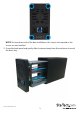
Note: To complete installation, power o the drive tray by placing the power switch
in the “o” position, and disconnecting the power adapter.
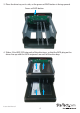
7.Slide the drive tray back into the enclosure, and replace the four screws on the back
panel using a Philip’s head screw driver.
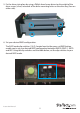
8. Using the included power adapter, connect the power adapter port on the
enclosure to an available power outlet.
9. Connect the USB 3.0 cable from the enclosure to a USB port on the host computer
system.
Your enclosure is now ready to use.