
Instruction manual

Instruction Manual
6
Setting Your RAID Conguration
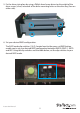
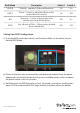
a) Using the RAID mode dip switches, and the above table, set the device to your
desired RAID Mode.
b) Power on the drive tray by connect the included power adapter from the power
adapter port on the back of the drive tray, to an available power outlet, and place
the power switch in the “on” position.
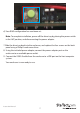
c) Hold the green set RAID button for at least 10 seconds, or until you see the green
power LED turn red and blue LEDs begin to blink, and then release the button.
RAID Mode Description Switch 1 Switch 2
RAID 0 Striping - Improves system performance On On
RAID1
Mirror – Creates a redundant drive on the
second drive for security
On O
BIG
Spanning – Creates a large single drive
volume consisting of both drives.
O On
JBOD
Just a Bunch of Disks – Allows access to both
drives individually
O O