
Instruction manual

Instruction Manual
7
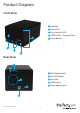
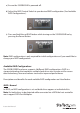
a) Ensure the S352BU33HR is powered o.
b) Adjust the RAID Control Switch to your desired RAID conguration (See Available
RAID Congurations).
c) Press and hold the set RAID button while turning on the S352BU33HR on by
pressing the Power Button.
Note: RAID conguration is only required for initial conguraiton or if you would like to
change your RAID conguration.
Available RAID Congurations
The S352BU33RER enclosure supports 4 dierent RAID congurations. RAID is a
storage technology that combines multiple hard drives into a single unit for secure
data redundancy, increased volume size and/or improved performance.
Descriptions and benets for each available RAID conguration are listed below:
JBOD - Normal
In JBOD, no RAID conguration is set and both drives appear as individual disks.
Note: For both drives to be detected while connected via eSATA the host controller
must support SATA Port Multiplier.