
Instruction manual

Instruction Manual
14
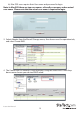
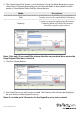
5. Your physically installed hard drives will be represented on the Create New VD Window.
Select each drive you would like included in your RAID array. Then click the Next Button.
Note: The Next button will not be selectable, until the correct number of physical
hard drives have been selected to build your desired array.
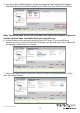
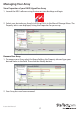
6. A default name will now be assigned to your RAID array. If you would like to
rename the array, click the Name eld and type your desired name. Then Select the
Initialization method for your choice.
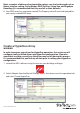
7. Next, select your desired stripe size using the Stripe size drop down menu. Then
click the submit button.