
Instruction manual


Instruction Manual
20
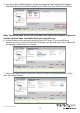
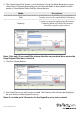
4. Click Submit to save your changes.
5. An alert window will be displayed, click OK to begin the optimization process.
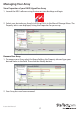
View Properties of your Physical Hard Drives
1. Launch the MSU software using the icon on your desktop, and login.
2. Select your desired physical disk from list of Physical Disks in the Marvell Storage
Menu. The Property tab is now displayed, listing the Properties for your disk.