
Instruction manual


Instruction Manual
21
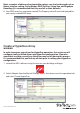
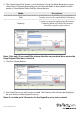
Note: Your physical disk properties cannot be edited.
Erase Foreign RAID Conguration
WARNING!
When erasing previously congured RAID Data, this enclosure will erase all drive
data. Please be aware that any data currently on the drives will be lost during this
process. It is recommended that you back up all data prior to erasing previously
congured RAID data.
RAID controllers store data on any drive within a RAID array. If your drives have been
previously congured in a dierent RAID array, this data must be deleted before a new
array can be built. Please follow the below steps to erase previously congured RAID
data.
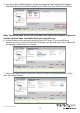
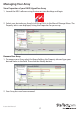
1. Select your desired physical disk from list of Physical Disks in the Marvell Storage
Menu. Hover-over the Operation tab and select Erase Foreign Conguration.
2. Your previously installed RAID data will now be deleted.