
Manual

Instruction Manual
6
How to Use
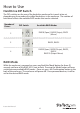
Hard Drive DIP Switch
The DIP switches on the rear of the hard drive enclosure rst needs to be set,
depending on the number of installed hard drives in the enclosure. The number of
hard drives aects the available RAID modes that can be selected.
Number of
Drives
DIP Switch Available RAID Modes
2
RAID0 (Span), RAID0 (Stripe), RAID1
(Mirror)
3 RAID3, RAID5
4
RAID0 (Span), RAID0 (Stripe), RAID3,
RAID5,
RAID10 (Stripe+Mirror)
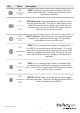
RAID Mode
While the enclosure is powered on, press and hold the ‘Mode’ button for three (3)
seconds until one of the RAID LED’s start to ash. Pressing the ‘Mode’ button will now
switch between available RAID modes. Once set, press the ‘Conrmation’ button in the
back of the enclosure. The enclosure will power o. Once powered back on, it will be
set for the desired RAID mode.