
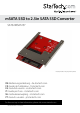
User Manual

Instruction Manual
3
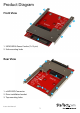
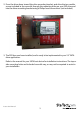
2. Press the drive down toward the drive mounting bracket, and drive the two smaller
screws included in the screw kit through the mounting holes on your SSD drive and
into the drive mounting bracket using a Philips head screw driver (not included).
3. The SSD has now been installed, and is ready to be implemented in your 2.5” SATA
drive application.
Refer to the manual for your SATA host device for installation instructions. The top or
side mounting holes and included screw kit may, or may not be required to assist in
your installation