
V-Stack
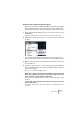


Table Of Contents

V-STACK
Audio effects 8 – 117
4. Open the effect’s control panel by clicking the Edit button and use the
Mix parameter to adjust the balance between “dry” and effect signal,
to 100% effect.
This is because the effect/dry balance can now be controlled using a combination of
send level and the group channel fader – see below.
5. Press [Alt]/[Option] and click on the Solo button for the group chan-
nel to activate Solo Group.
In this mode, the group channel will not be muted if you solo another channel in the
mixer (see below).
6. Play the VST Instrument.
The following is now possible:
• By adjusting the send level you will control the amount of channel sig-
nal sent to the ”effect” (or to be accurate, the group channel).
• The level fader for the group channel now serves as effect return level
control, allowing you to set the dry/effect balance.
If you pull down the group channel fader, you should now hear the signal with no
effect.
• Since Solo Group is activated for the group channel, you can solo any of
the channels without having the effect return (the group) muted.
If you need to turn off Solo Group, [Alt]/[Option]-click the Solo button for the group
channel again.
• Adding more insert effects to the group allows you to process the ef-
fect output further.
• Simply repeat steps 1- 2 for all (stereo) channels you wish to process
using this method.
• Since there are four group channels in V-STACK, you can have up to
four different “multi-effects” with this method.