
V-Stack

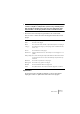

Table Of Contents

V-STACK
Audio effects 8 – 119
❐
Please note that a plug-in may be in use even if it isn’t enabled in the left
column. You might for example have opened a Song containing effects
that currently are disabled on the menu. The left column purely deter-
mines whether or not the plug-in will be visible on the Effect menus.
• All columns can be resized by using the divider in the column header.
The rest of the columns show the following information about each
plug-in:
Update Button
Pressing this button will make V-STACK re-scan the designated
Vstplugins folders for updated information about the plug-ins.
Column Description
Name The name of the plug-in.
Nb I/O This column shows the number of inputs and outputs for each plug-in.
Category This indicates the category of each plug-in (such as VST Instruments,
effects, etc.).
Vendor The manufacturer of the plug-in.
VST Version Indicates with which version of the VST protocol each plug-in is com-
patible.
Delay (sample) This shows the delay (in samples) that will be introduced if the effect is
used as an Insert. This is however automatically compensated for by
V-STACK.
Nb Params The number of parameters for the plug-in.
Nb Programs The number of programs for the plug-in.
Modified The last modification date of the plug-in file.
Folder The path and name of the folder in which the plug-in file is located.