
V-Stack
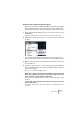


Table Of Contents

V-STACK
8 – 120 Audio effects
Changing the Shared Plug-ins Folder (Windows only)
If you like, you can change what folder is to be the “shared” Vstplugins
folder. For example, if you have Steinberg’s Cubase SX installed on
your computer, you can get access to the Cubase SX-specific plug-
ins in V-STACK by switching to the Vstplugins folder within the Cu-
base SX folder.
The currently selected Shared Folder is displayed in the text field at
the top of the window. Clicking the “Choose...” button opens a file di-
alog where you can browse to another Vstplugins folder on your hard
drive. Clicking OK selects the new folder as the shared VST plug-ins
folder.
❐
After selecting a new shared plug-ins folder, you need to restart V-STACK
for the effects in the new folder to become available.