
V-Stack

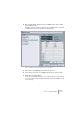
Table Of Contents

V-STACK
9 – 124 Remote controlling the Mixer
Background
It is possible to control the V-STACK Mixer via MIDI. Currently, the fol-
lowing MIDI control devices are supported:
• Steinberg Houston (see page 127)
• Mackie Control (see page 127)
• CM Automation Motor Mix (see page 128)
• JL Cooper CS-10 (see page 129)
• JL Cooper MCS-3000 (see page 130)
• Radikal SAC-2k (see page 132)
• Roland MCR8 (see page 131)
• Tascam US-428 (see page 134)
• Yamaha 01V (see page 135)
• Yamaha DM2000 (see page 127)
There is also a Generic Remote Device, allowing you to use any MIDI
controller to remote control V-STACK.
Operations
Selecting a remote device
1. Make sure the MIDI control device is connected to your MIDI interface.
You need to connect the MIDI Out on the remote unit to a MIDI In on your MIDI interface.
Depending on the remote unit model, you may also need to connect a MIDI Out on the
interface to a MIDI In on the remote unit (this is necessary if the remote unit features
“feedback devices” such as indicators, motorized faders, etc.). See the MIDI control de-
vice specifications on the following pages for details.
2. Pull down the Devices menu and select Device Setup.
A dialog window opens with a list of devices shown in the left part of the window.
3. If you can’t find the remote device you are looking for, click on the
Add/Remove tab and select it from the Device Classes menu.
Click “Add” to add it to the Devices list.
• Note that it is possible to select more than one remote device of the
same type.
If you have more than one remote device of the same type, these will be numbered in
the Device list.