
V-Stack

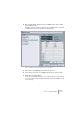
Table Of Contents

V-STACK
Remote controlling the Mixer 9 – 125
4. Now click the Setup tab and select your MIDI control device model
from the Devices list.
Depending on the selected device, either a list of programmable function commands
or a blank panel is shown in the right half of the dialog window.
A JL Cooper MCS-3000 selected as remote control device.
5. Select the correct MIDI input from the pop-up menu.
6. If necessary, select the correct MIDI output from the pop-up menu.
7. Click OK to close the dialog.
You can now use the MIDI control device to move faders and knobs, activate mute and
solo, etc. The exact parameter configuration depends on which external MIDI control de-
vice you are using.