
V-Stack

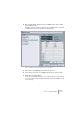
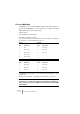
Table Of Contents

V-STACK
9 – 126 Remote controlling the Mixer
Assigning remote key commands
For some of the supported remote devices, you can assign V-STACK
functions to generic buttons, wheels or other controls. As of this writ-
ing, these devices are:
• JL Cooper MCS 3000
• JL Cooper CS-10
• CM Automation Motor Mix
Proceed as follows:
1. Open the Device Setup and select one of the remote devices that
support this feature.
On the right side of the window there are three columns. This is where you assign
commands.
2. Use the “Button” column to locate a Remote device control or button
to which you wish to assign a V-STACK function.
3. Click in the “Category” column for the control, and select one of the
V-STACK function categories from the pop-up menu that appears.
A typical use would be to select the “Devices” category and have the buttons open
and close different VST windows.
4. Click in the “Command” column, and select the desired V-STACK
function from the pop-up menu that appears.
The available items on the pop-up menu depend on the selected category.
Click “Apply” when you are done.The selected function is now as-
signed to the button or control on the remote device.