
V-Stack

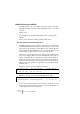
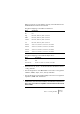
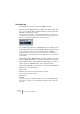
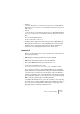
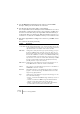
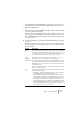
Table Of Contents

V-STACK
Remote controlling the Mixer 9 – 133
When pressing an encoder dial the currently selected band of EQ or
FX-Send will be activated or deactivated.
Assignment mapping for the Mixer mode buttons:
Assignment mapping for the Channel Strip buttons:
• The buttons “1-8”, “9-16”, “17-24” and “25-31” will switch to the ac-
cording channels.
• The following buttons of the Mixer-Mode section have no assignment:
“Snd/Ins”, “MIDI”, “Input”, “Inst”, “Group” and “Bus”.
• The following buttons of the Channel Strip section have no assignment:
“Dynamics”, “MIDI” and “Instruments”.
❐
The SAC-2K supports “MIDI Feedback”, allowing fader settings and
channel mute, solo and selection status to be indicated on the panel. For
this to work, you need a two-way MIDI connection between the SAC-2K
and V-STACK.
Mode Assignment
Pan Pan
High EQ4 Gain, EQ4 Freq, EQ4 On, EQ4 Q
HiMid EQ3 Gain, EQ3 Freq, EQ3 On, EQ3 Q
LowMid EQ2 Gain, EQ2 Freq, EQ2 On, EQ2 Q
Low EQ1 Gain, EQ1 Freq, EQ1 On, EQ1 Q
Snd/Ins1 Send1 Level, Send1 On, Send1 Pre, Send1 Bus
Snd/Ins2 Send2 Level, Send2 On, Send2 Pre, Send2 Bus
Snd/Ins3 Send3 Level, Send3 On, Send3 Pre, Send3 Bus
Snd/Ins4 Send4 Level, Send4 On, Send4 Pre, Send4 Bus
Mode Assignment
EQs EQs
Inserts/Sends Send Level, Send On, Send Pre, Send Bus