
V-Stack

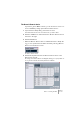
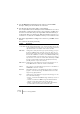
Table Of Contents

V-STACK
Remote controlling the Mixer 9 – 137
The Generic Remote device
If you have a generic MIDI controller, you can use this for remote con-
trol of V-STACK by setting up the Generic Remote device:
1. Open the Device Setup dialog on the Devices menu.
If the Generic Remote device isn’t on the Devices list, you need to add it:
2. Click the “Add/Remove” tab and select the “Generic Remote” device
in the list to the right.
3. Click the Add button.
• When the Generic Remote device is added in the Device Setup dia-
log, you can open the Remote Status window by selecting “Generic
Remote” from the Devices menu.
The Remote Status window
4. Click the Setup tab and select the Generic Remote device in the
Devices list to the left.
The settings for the Generic Remote are displayed, allowing you to specify which con-
trol on your device should control which parameter in V-STACK.