
V-Stack

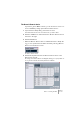
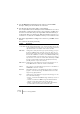
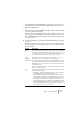
Table Of Contents

V-STACK
9 – 138 Remote controlling the Mixer
5. Use the MIDI Input and Output pop-up menu to select the MIDI
Port(s) to which your remote device is connected.
6. Use the pop-up menu to the right to select a bank.
The concept of banks is based on the simple fact that most MIDI devices can control a
limited number of channels at a time (often 8 or 16). For example, if your MIDI control
device has 16 volume faders, and you are using 32 Mixer channels in V-STACK, you
would need two banks of 16 channels each. When the first bank is selected you con-
trol channel 1 to 16; when the second Bank is selected you control channel 17 to 32.
7. Set up the upper table according to the controls on your MIDI control
device.
The columns have the following functionality:
Column Description
Control Name Double clicking this field allows you to enter a descriptive name for the
control (typically a name written on the console). This name is automati-
cally reflected in the Control Name column in the lower table.
MIDI Status Clicking in this column pulls down a pop-up menu, allowing you to spec-
ify the type of MIDI message sent by the control. The options are Con-
troller, Program Change, Note On, Note Off, Aftertouch and Polyphonic
Pressure. Also available are Continuous Control NRPN and RPN, a way
to extend the available control messages. The “Ctrl JLCooper” option is
a special version of a Continuous Controller where the 3rd byte of a MIDI
message is used as address instead of the 2nd byte (a method sup-
ported by various JL-Cooper remote devices).
MIDI Channel Clicking in this column pulls down a pop-up menu, allowing you to se-
lect the MIDI channel on which the controller is transmitted.
Address The Continuous Controller number, the pitch of a note or the address of
a NRPN/RPN Continuous Controller.
Max. Value The maximum value the control will transmit. This value is used by the
program to “scale” the value range of the MIDI controller to the value
range of the program parameter.
Flags Clicking in this column pulls down a pop-up menu, allowing you to acti-
vate or deactivate three flags:
• Receive – activate this if the MIDI message should be processed on
reception.
• Transmit – activate this if a MIDI message should be transmitted
when the corresponding value in the program changes.
• Relative – activate this if the control is an “endless” dial, which re-
ports the number of turns instead of an absolute value.