
V-Stack
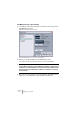
Table Of Contents

V-STACK
4 – 30 Setting up your system
VST Multitrack setup – Basic Settings
1. In V-STACK, select Device Setup from the Devices menu and click on
VST Multitrack in the list.
Make sure the “Setup” tab is selected.
The VST Multitrack panel in the Device Setup dialog.
2. Select your audio hardware from the ASIO Driver menu.
There may be several options here that all refer to the same audio hardware:
❐
We strongly recommend that you access your hardware via an ASIO
driver written specifically for the hardware, if available. If no ASIO driver is
installed we recommend that you check with your audio hardware manu-
facturer if they have an ASIO driver available, for example for download
via the Internet.
3. Bring up the control panel for the audio hardware and adjust the set-
tings as recommended by the audio hardware manufacturer.