
V-Stack
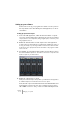
Table Of Contents

V-STACK
4 – 40 Setting up your system
Setting up your software
Now it’s time to set up your programs. For details on how to perform
the steps below in the other VST System Link application, see its do-
cumentation.
Setting up inputs and outputs
1. In the other VSL application, enable the desired number of outputs.
You need one output bus (digital output) for VST System Link connected to the V-STACK
computer, and one or more output buses (analog or digital outputs) connected to your lis-
tening equipment, mixer, etc.
2. Enable the desired number of audio inputs in the other application.
To make it simple you will probably want to enable all inputs available in the cable you
are using. For example, if you are using an ADAT connection this would mean activat-
ing the first four stereo input pairs. See the documentation for the program for details
on how to do this.
3. In V-STACK, open the VST Outputs window from the Devices menu.
This shows all available output buses – the number of stereo buses corresponds to the
number of outputs on your audio interface.
4. Enable the output buses you need.
Usually these should match up to the input buses you enabled in the other application.
In our ADAT example, this would mean the first four stereo outputs.
Now, the audio output of the VST Instruments in V-STACK will be sent
via the digital connection into the other computer. However, there’s
still no MIDI connection – first you have to activate VST System Link.